Sorting Algorithms
Objectives
Sorting refers to arranging data in a particular format. Sorting algorithm specifies the way to arrange data in a particular order. Most common orders are in numerical or lexicographical order.
The importance of sorting lies in the fact that data searching can be optimized to a very high level, if data is stored in a sorted manner. Sorting is also used to represent data in more readable formats. Below we see five such implementations of sorting in python.
- Bubble Sort
- Merge Sort
- Insertion Sort
- Shell Sort
- Selection Sort
Bubble Sort
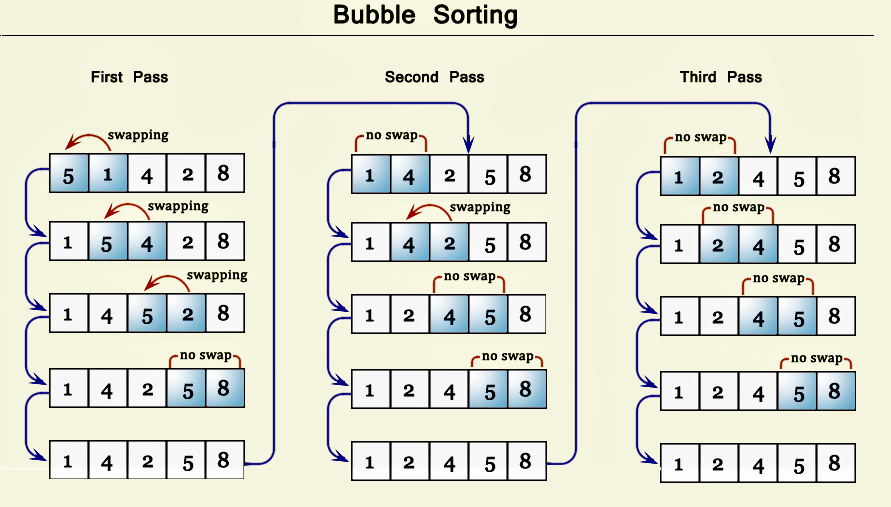
It is a comparison-based algorithm in which each pair of adjacent elements is compared and the elements are swapped if they are not in order.
def bubblesort(list):
Swap the elements to arrange in order
    for iter\_num in range(len(list) -1, 0, -1):
        for idx in range(iter\_num):
            if list[idx] \> list[idx+1]:
                temp = list[idx]
                list[idx] = list[idx+1]
                list[idx+1] = temp
list =[19,2,31,45,6,11,121,27]
bubblesort(list)
print(list)
When the above code is executed, it produces the following result:
[2,6,11,19,27,31,45,121]
Write a Python program to sort a list of elements using the bubble sort algorithm.
Note: According to Wikipedia "Bubble sort, sometimes referred to as sinking sort, is a simple sorting algorithm that repeatedly steps through the list to be sorted, compares each pair of adjacent items and swaps them if they are in the wrong order. The pass through the list is repeated until no swaps are needed, which indicates that the list is sorted. The algorithm, which is a comparison sort, is named for the way smaller elements "bubble" to the top of the list. Although the algorithm is simple, it is too slow and impractical for most problems even when compared to insertion sort. It can be practical if the input is usually in sort order but may occasionally have some out-of-order elements nearly in position.
Step by step pictorial presentation:
Merge Sort
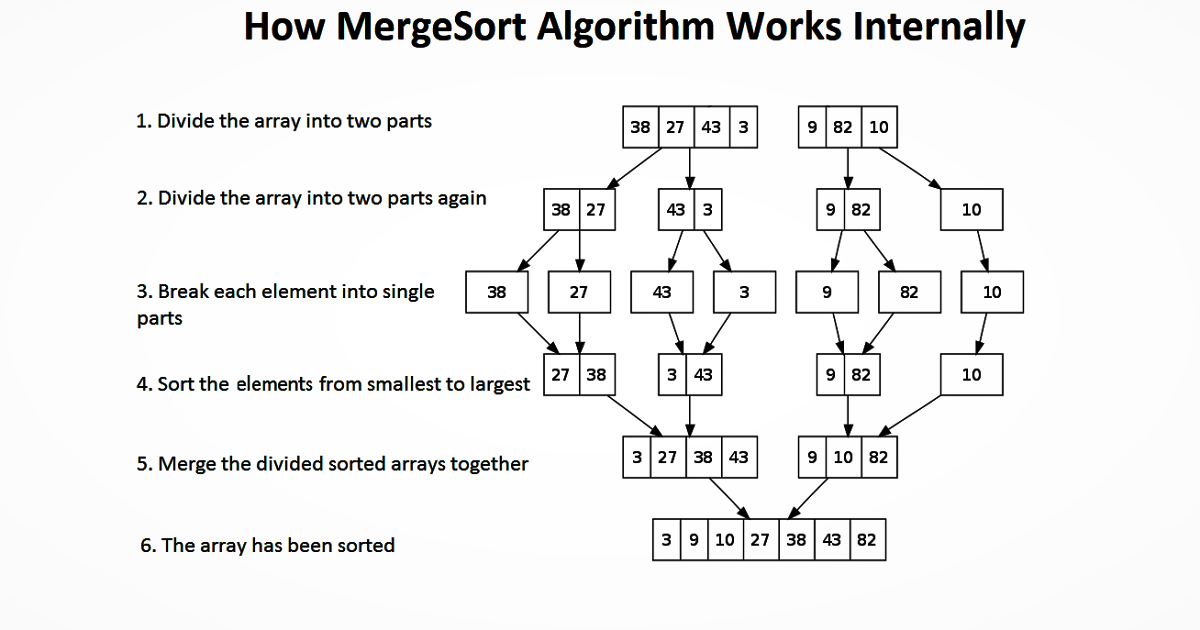
Merge sort divides the array into equal halves and then combines them in a sorted manner
def merge\_sort(unsorted\_list):
    if len(unsorted\_list)\<=1:
        return unsorted\_list
Find the middle point and devide it
    middle = len(unsorted\_list)// 2
    left\_list = unsorted\_list[:middle]
    right\_list = unsorted\_list[middle:]
    left\_list = merge\_sort(left\_list)
    right\_list = merge\_sort(right\_list)
    return list(merge(left\_list, right\_list))
Merge the sorted halves
def merge(left\_half,right\_half):
    res =[]
    while len(left\_half)!= 0 and len(right\_half)!= 0:
        if left\_half[0]\< right\_half[0]:
            res.append(left\_half[0])
            left\_half.remove(left\_half[0])
        else:
            res.append(right\_half[0])
            right\_half.remove(right\_half[0])
    if len(left\_half) == 0:
        res = res + right\_half
    else:
        res = res + left\_half
    return res
unsorted\_list =[64,34,25,12,22,11,90]
print(merge\_sort(unsorted\_list))
When the above code is executed, it produces the following result:
[11,12,22,25,34,64,90]
Insertion Sort
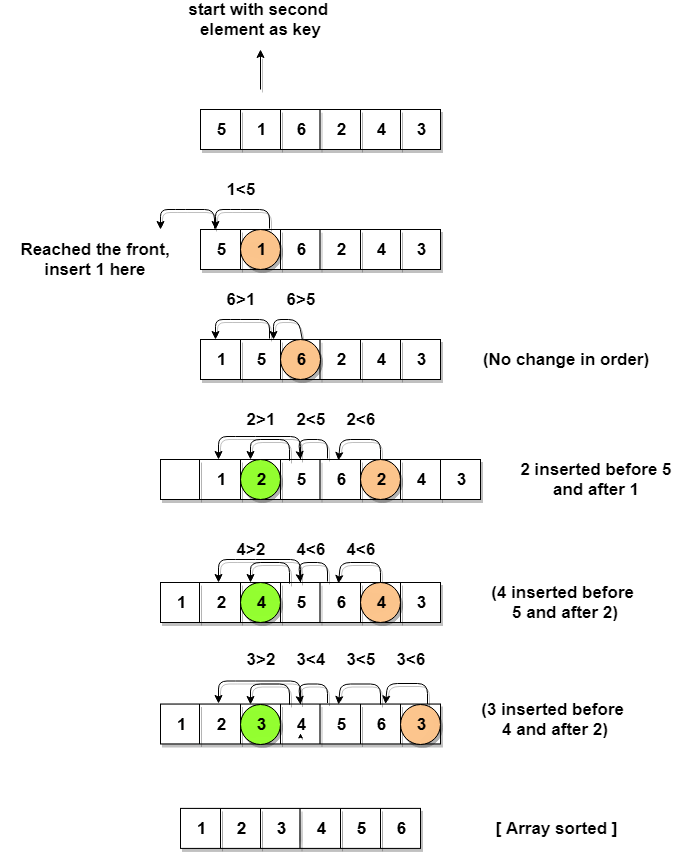
Insertion sort involves finding the right place for a given element in a sorted list. So in beginning we compare the first two elements and sort them by comparing them. Then we pick the third element and find its proper position among the previous two sorted elements. This way we gradually go on adding more elements to the already sorted list by putting them in their proper position.
def insertion\_sort(InputList):
    for i in range(1, len(InputList)):
        j = i-1
        nxt\_element =InputList[i]
# Compare the current element with next one
        while(InputList[j]\> nxt\_element)and(j\> = 0):
            InputList[j+1]  =InputList[j]
            j = j-1
        InputList[j+1] = nxt\_element
list = [19,2,31,45,30,11,121,27]
insertion\_sort(list)
print(list)
When the above code is executed, it produces the following result:
[2,11,19,27,30,31,45,121]
Shell Sort
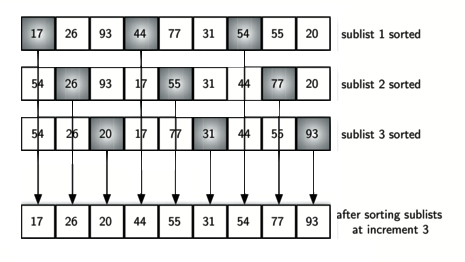
Shell Sort involves sorting elements which are away from ech other. We sort a large sublist of a given list and go on reducing the size of the list until all elements are sorted. The below program finds the gap by equating it to half of the length of the list size and then starts sorting all elements in it. Then we keep resetting the gap until the entire list is sorted.
def shellSort(input\_list):
    gap = len(input\_list)// 2
    while gap \>0:
        for i in range(gap, len(input\_list)):
            temp = input\_list[i]
            j = i
# Sort the sub list for this gap
            while j \> = gap and input\_list[j - gap]\> temp:
                input\_list[j] = input\_list[j - gap]
                j = j-gap
            input\_list[j] = temp
# Reduce the gap for the next element
        gap = gap//2
list =[19,2,31,45,30,11,121,27]
shellSort(list)
print(list)
When the above code is executed, it produces the following result:
[2,11,19,27,30,31,45,121]
Selection Sort
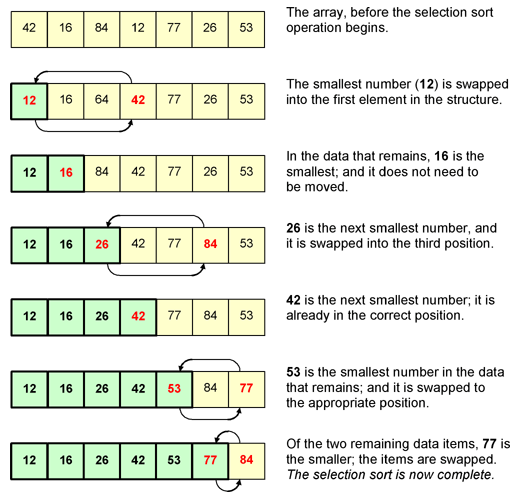
In selection sort we start by finding the minimum value in a given list and move it to a sorted list. Then we repeat the process for each of the remaining elements in the unsorted list. The next element entering the sorted list is compared with the existing elements and placed at its correct position. So at the end all the elements from the unsorted list are sorted.
def selection\_sort(input\_list):
    for idx in range(len(input\_list)):
        min\_idx = idx
        for j in range( idx +1, len(input\_list)):
            if input\_list[min\_idx]\> input\_list[j]:
                min\_idx = j
Swap the minimum value with the compared value
        input\_list[idx], input\_list[min\_idx]= input\_list[min\_idx], input\_list[idx]

l =[19,2,31,45,30,11,121,27]
selection\_sort(l)
print(l)
When the above code is executed, it produces the following result:
[2,11,19,27,30,31,45,121]