Singly linked lists
A singly linked list is a list with only one pointer between two successive nodes. It can only be traversed in a single direction, that is, you can go from the first node in the list to the last node, but you cannot move from the last node to the first node.
We can actually use the node class that we created earlier to implement a very simple singly linked list:
    >>> n1 = Node('eggs')
    >>> n2 = Node('ham')
    >>> n3 = Node('spam')
Next we link the nodes together so that they form a chain:
    >>> n1.next = n2
    >>> n2.next = n3
To traverse the list, you could do something like the following. We start by setting the variable current to the first item in the list:
    current = n1
    while current:
        print(current.data)
        current = current.next
In the loop we print out the current element after which we set current to point to the next element in the list. We keep doing this until we have reached the end of the list.
There are, however, several problems with this simplistic list implementation:
It requires too much manual work by the programmer It is too error-prone (this is a consequence of the first point) Too much of the inner workings of the list is exposed to the programmer We are going to address all these issues in the following sections.
Singly linked list class
A list is clearly a separate concept from a node. So we start by creating a very simple class to hold our list. We will start with a constructor that holds a reference to the very first node in the list. Since this list is initially empty, we will start by setting this reference to None:
    class SinglyLinkedList:
         def __init__(self):
             self.tail = None
Append operation
The first operation that we need to perform is to append items to the list. This operation is sometimes called an insert operation. Here we get a chance to hide away the Node class. The user of our list class should really never have to interact with Node objects. These are purely for internal use.
A first shot at an append() method may look like this:
    class SinglyLinkedList:
         # ...

         def append(self, data):
             # Encapsulate the data in a Node
             node = Node(data)

             if self.tail == None:
                 self.tail = node
             else:
                 current = self.tail
                 while current.next:
                     current = current.next
                 current.next = node
We encapsulate data in a node, so that it now has the next pointer attribute. From here we check if there are any existing nodes in the list (that is, does self.tail point to a Node). If there is none, we make the new node the first node of the list; otherwise, find the insertion point by traversing the list to the last node, updating the next pointer of the last node to the new node.
We can append a few items:
>>> words = SinglyLinkedList()
>>> words.append('egg')
>>> words.append('ham')
>>> words.append('spam')
List traversal will work more or less like before. You will get the first element of the list from the list itself:
>>> current = words.tail
>>> while current:
        print(current.data)
        current = current.next
A faster append operation
There is a big problem with the append method in the previous section: it has to traverse the entire list to find the insertion point. This may not be a problem when there are just a few items in the list, but wait until you need to add thousands of items. Each append will be slightly slower than the previous one. A O(n) goes to prove how slow our current implementation of the append method will actually be.
To fix this, we will store, not only a reference to the first node in the list, but also a reference to the last node. That way, we can quickly append a new node at the end of the list. The worst case running time of the append operation is now reduced from O(n) to O(1). All we have to do is make sure the previous last node points to the new node, that is about to be appended to the list. Here is our updated code:
    class SinglyLinkedList:
         def __init__(self):
             # ...
             self.tail = None

         def append(self, data):
            node = Node(data)
            if self.head:
                self.head.next = node
                self.head = node
            else:
                self.tail = node
                self.head = node
Take note of the convention being used. The point at which we append new nodes is through self.head. The self.tail variable points to the first node in the list.
Getting the size of the list
We would like to be able to get the size of the list by counting the number of nodes. One way we could do this is by traversing the entire list and increasing a counter as we go along:
    def size(self):
         count = 0
         current = self.tail
         while current:
             count += 1
             current = current.next
         return count
This works, but list traversal is potentially an expensive operation that we should avoid when we can. So instead, we shall opt for another rewrite of the method. We add a size member to the SinglyLinkedList class, initializing it to 0 in the constructor. Then we increment size by one in the append method:
class SinglyLinkedList:
     def __init__(self):
         # ...
         self.size = 0

     def append(self, data):
         # ...
         self.size += 1
Because we are now only reading the size attribute of the node object, and not using a loop to count the number of nodes in the list, we get to reduce the worst case running time from O(n) to O(1).
Improving list traversal
If you notice how we traverse our list. That one place where we are still exposed to the node class. We need to use node.data to get the contents of the node and node.next to get the next node. But we mentioned earlier that client code should never need to interact with Node objects. We can achieve this by creating a method that returns a generator. It looks as follows:
    def iter(self):
        current = self.tail
        while current:
            val = current.data
            current = current.next
            yield val
Now list traversal is much simpler and looks a lot better as well. We can completely ignore the fact that there is anything called a Node outside of the list:
    for word in words.iter():
        print(word)
Notice that since the iter() method yields the data member of the node, our client code doesn't need to worry about that at all.
Deleting nodes
Another common operation that you would need to be able to do on a list is to delete nodes. This may seem simple, but we'd first have to decide how to select a node for deletion. Is it going to be by an index number or by the data the node contains? Here we will choose to delete a node by the data it contains.
The following is a figure of a special case considered when deleting a node from the list:
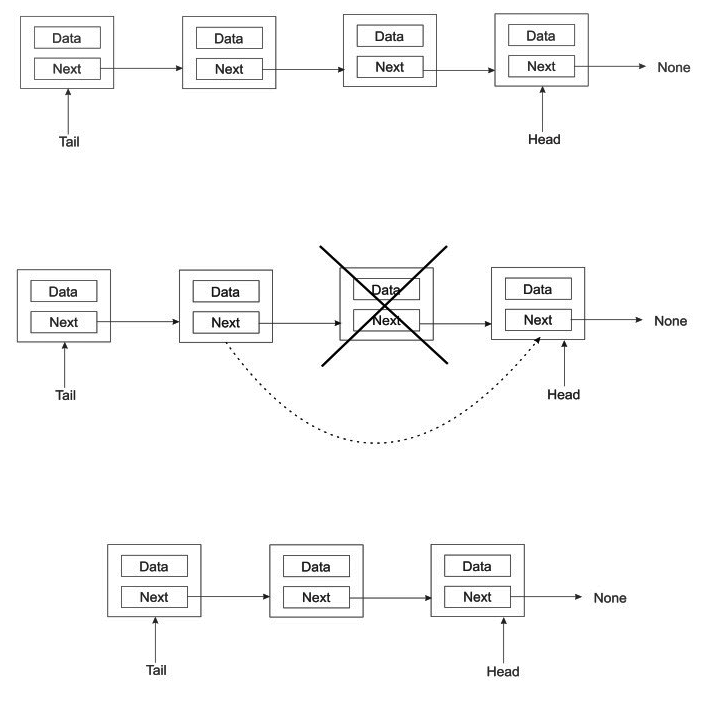
When we want to delete a node that is between two other nodes, all we have to do is make the previous node directly to the successor of its next node. That is, we simply cut the node to be deleted out of the chain as in the preceding image.
Here is the implementation of the delete() method may look like:
  def delete(self, data):
        current = self.tail
        prev = self.tail
        while current:
            if current.data == data:
                if current == self.tail:
                    self.tail = current.next
                else:
                    prev.next = current.next
                self.size -= 1
                return
            prev = current
            current = current.next
It should take a O(n) to delete a node.
List search
We may also need a way to check whether a list contains an item. This method is fairly easy to implement thanks to the iter() method we previously wrote. Each pass of the loop compares the current data to the data being searched for. If a match is found, True is returned, or else False is returned:
def search(self, data):
     for node in self.iter():
         if data == node:
             return True
     return False
Clearing a list
We may want a quick way to clear a list. Fortunately for us, this is very simple. All we do is clear the pointers head and tail by setting them to None:
def clear(self):
       """ Clear the entire list. """
       self.tail = None
       self.head = None
In one fell swoop, we orphan all the nodes at the tail and head pointers of the list. This has a ripple effect of orphaning all the nodes in between.
Performance Lab
- Complete the Linked List Performance Lab